Let's cut through the noise
Every "best free tools" list online is either outdated or written by someone who never actually hit the limits of a free plan. Half the tools people recommend in 2026 don't even have free plans anymore.
I signed up for every tool on this list. Here's what you actually get for zero dollars — and where each one tries to push you into paying.
1. Buffer Free — the old reliable
Buffer has had a free plan for over a decade, and they haven't killed it. That alone is worth respecting.
What you get for free:
- 3 social channels (from Facebook, Instagram, X, LinkedIn, TikTok, Pinterest, Threads, Mastodon, Bluesky, YouTube, Google Business)
- 10 scheduled posts per channel (queue cap — 30 total at any time)
- AI Assistant for caption generation (text-only)
- Start Page (a link-in-bio landing page builder)
- Basic analytics
What you don't get:
- Engagement tools (no unified inbox)
- Team collaboration
- Custom scheduling times (you get Buffer's default slots)
- Analytics beyond basic post performance
The catch: The 10-post limit is per channel queue, not per month. Once a post publishes, the slot opens. If you post daily on 3 channels, you'll constantly bump into this ceiling. There's also a lifetime limit of 8 unique channel connections.
Best for: Solopreneurs who post a few times a week across 2-3 platforms and want a dead-simple tool that just works.
2. SonetHub Free — AI-first scheduling
Full disclosure: this is our product. Same honest breakdown as every other tool here.
What you get for free:
- 2 social accounts (Instagram, Facebook, X, LinkedIn, Threads, TikTok, YouTube, Pinterest, Bluesky)
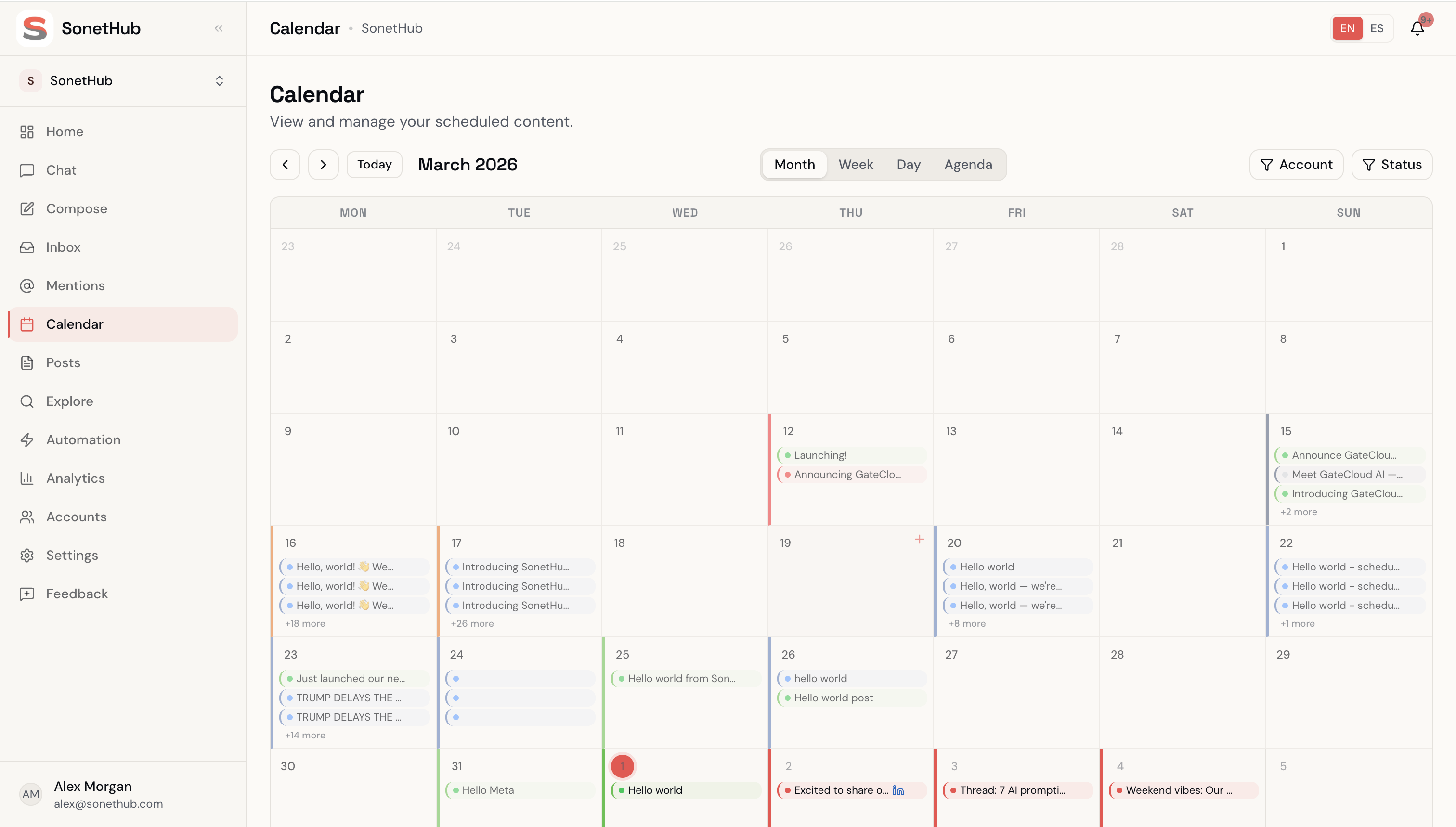
- 3 publishes per day — no monthly cap (schedule unlimited drafts; the cron drips out 3/day)
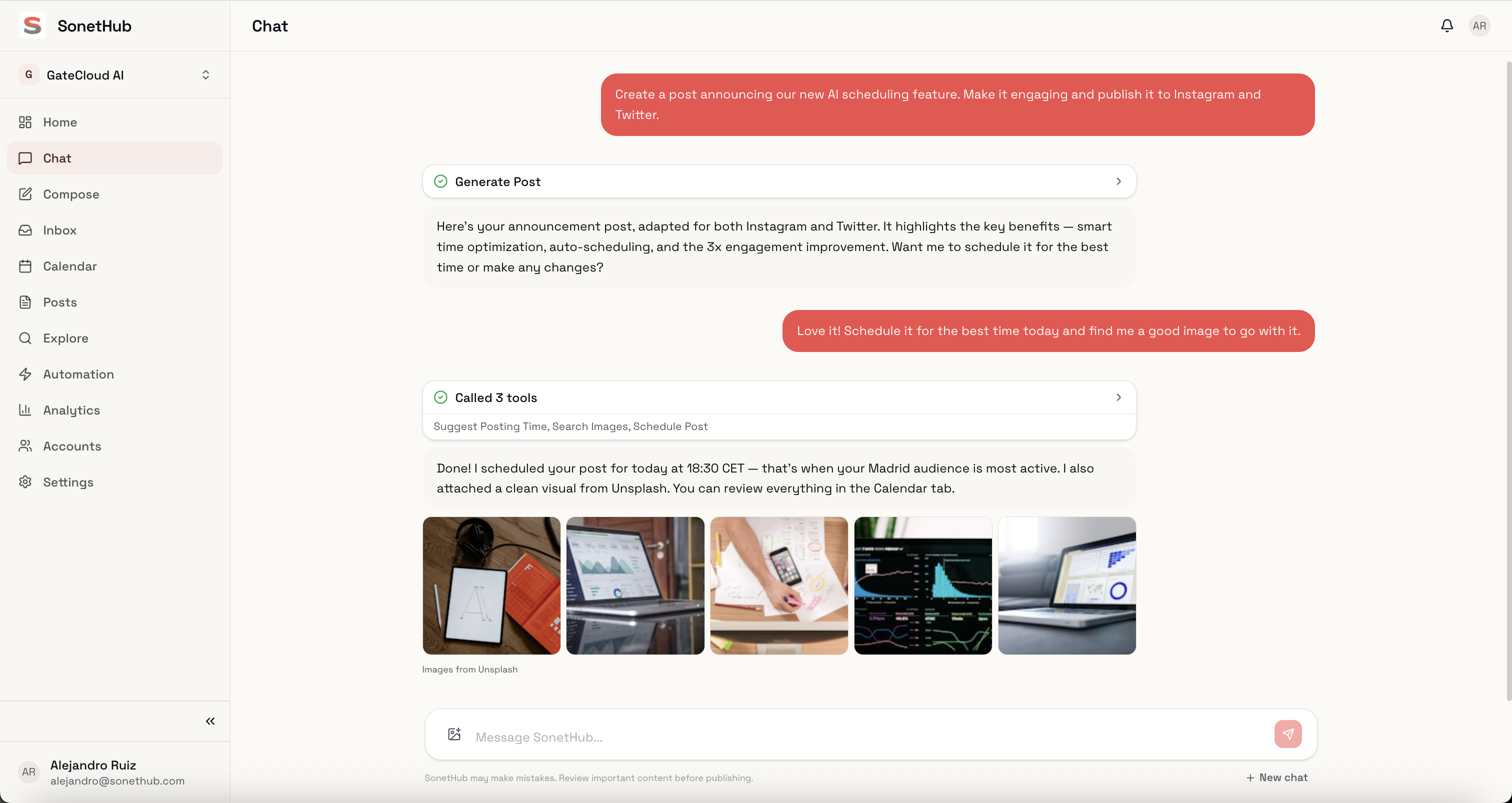
- AI chat agent that writes posts, generates images, pulls analytics, builds automations
- Basic analytics dashboard
- Brand memory (AI learns your voice from your edits over time)
What you don't get:
- More than 3 publishes per day
- Team features
- Multi-step automation flows (automation engine is paid)
- Advanced analytics
- Priority support
The catch: 3 posts per day caps your live throughput, but creation/scheduling is unlimited — you can build a 100-post content library, schedule it across the month, and the cron drips out 3/day. Over a year, that's ~1,100 posts theoretical max. The AI agent is the differentiator: it generates text + images, runs analytics queries, and the automation canvas is visible (creation is paid-only).
Best for: Creators who want to test AI-powered social management before committing to a paid tool. The free tier gives you the full AI experience at moderate throughput.
3. Meta Business Suite — unlimited and underrated
If you only care about Facebook and Instagram, stop reading. This is your answer.
What you get for free:
- Unlimited post scheduling for Facebook and Instagram
- Schedule up to 75 days in advance
- Unified inbox (Messenger + Instagram DMs + comments)
- Detailed analytics and audience insights
- Stories and Reels scheduling
- Ad management
What you don't get:
- Any platform besides Facebook and Instagram
- Third-party integrations
- AI content generation
- Multi-brand management
- Automation engine for inbox
The catch: It only works with Meta's platforms. The interface is clunky and slow — Meta redesigns it every few months without fixing core UX issues. But the functionality is genuinely complete for those two platforms: scheduling, inbox, analytics, audience insights, all free, no limits.
Best for: Small businesses whose customers are primarily on Facebook and Instagram. If that's you, there's zero reason to pay for a third-party scheduler for those two platforms.
4. Zoho Social Free — generous channels, no scheduling
Zoho Social has a forever-free plan that's surprisingly broad in some ways and frustrating in others.
What you get for free:
- 1 brand, 1 user
- 6 channels (Facebook Page, Instagram Business, LinkedIn Profile/Company, X, Google Business Profile, and more)
- 5 AI credits/month for caption generation
- Direct publishing (post immediately)
- Basic post composer
- zShare browser extension for content curation
What you don't get:
- Post scheduling — only direct publishing on the free plan
- Analytics beyond surface-level stats
- Bulk publishing
- Team collaboration
- Content calendar
The catch: You can connect up to 6 channels, the most generous channel count on any free plan. But you can't schedule posts in advance — only publish them immediately. For a "social media scheduler," that's a fundamental missing piece. Scheduling requires the Standard plan at $10/brand/user/month annual ($15 monthly).
Best for: People who manage multiple channels and are happy to post in real-time. If you always create and publish in the same sitting, the channel count makes this attractive. If you batch-create and schedule for later — the whole point of a scheduler — look elsewhere.
5. Canva Content Planner — not actually free
This one makes every "free scheduler" list, and it shouldn't.
The truth: Canva's Content Planner — the feature that schedules and auto-publishes posts — is only available on Canva Pro ($15/month or $120/year). Free Canva users can see the content calendar but cannot schedule posts to social media.
Canva does offer a 30-day free trial of Pro, which gives you access to scheduling. But a trial is not a free plan.
What free Canva actually gives you for social media:
- Design templates for social posts (great selection)
- Export to correct dimensions per platform
- A content calendar you can look at but not publish from
Best for: People who already pay for Canva Pro and want to reduce their tool count. If you're looking for a free scheduler specifically, this isn't one.
6. Later — free plan discontinued
Later used to have a decent free plan. In 2025, they killed it.
Current situation: Later offers only a 14-day free trial. After that, the cheapest plan (Starter) costs $25/month or $18.75/month annual. Includes 1 social set, 30 posts/profile, 1 user, 5 AI credits/month.
Later still has a strong product — especially for Instagram-focused creators with its visual planner and Linkin.bio feature, plus 2026's influencer marketing surface. But it's no longer a free option.
If you liked Later's free plan: Buffer or SonetHub gives you a similar basic scheduling experience at no cost.
7. Zoho Social over Crowdfire (RIP)
Crowdfire shut down on May 15, 2025, after 15 years. The company cited rising infrastructure costs and the fact that most social platforms now offer native scheduling tools.
If you were a Crowdfire user, Zoho Social's free plan is the closest replacement — similar channel breadth, though without the scheduling that Crowdfire offered. Buffer or SonetHub is the better fit if scheduling is what you need.
The honest comparison table
Here's what each free plan actually gives you, side by side:
| Tool | Free plan? | Channels | Post limit | Scheduling | AI features | Inbox |
|---|---|---|---|---|---|---|
| Buffer | Yes | 3 | 10/channel queue | Yes | AI text Assistant | Reply (comments) |
| SonetHub | Yes | 2 | 3 publishes/day, unlimited creation | Yes | Full AI agent (text + image) | AI-powered |
| Meta Business Suite | Yes | 2 (FB + IG only) | Unlimited | Yes | — | Yes (Meta only) |
| Zoho Social | Yes | 6 | Direct publish only | — | 5 credits/mo | — |
| Canva | — (Pro only) | — | — | Pro only ($15/mo) | — | — |
| Later | — (14-day trial) | — | — | Starts at $18.75/mo | Limited | — |
| TweetDeck / X Pro | — | — | — | Requires X Premium | — | — |
| Crowdfire | Shut down | — | — | — | — | — |
So which one should you pick?
If you only manage Facebook + Instagram: Meta Business Suite. It's free, unlimited, and purpose-built. Don't overthink this.
If you post to 2-3 platforms a few times a week: Buffer Free. The 10-post queue per channel is enough for light use, the AI assistant helps with writer's block, and the Start Page is a nice bonus.
If you want to test AI-powered management: SonetHub Free. 3 publishes/day caps live throughput, but you get to talk to an AI that writes, designs, schedules, and previews automations — not just a caption generator. Use the free tier to see if the AI workflow fits how you think.
If you manage many channels and post in real-time: Zoho Social Free. Six channels is unmatched among free plans. Just know you're giving up scheduling.
If you need serious scheduling for free: Combine Meta Business Suite (for Facebook + Instagram, unlimited) with Buffer Free or SonetHub Free (for everything else). Two tools, zero cost, decent coverage.
The bottom line
Most "free" social media schedulers in 2026 are either trial periods, stripped-down dashboards, or recently deceased. The genuinely usable free options are Buffer, Meta Business Suite, SonetHub, and Zoho Social — each with real tradeoffs.
No free plan will handle everything. The question is which limits you can live with — and which ones push you to upgrade before you're actually ready.
Try SonetHub Free — 2 accounts, AI chat agent, no credit card.
All prices exclude applicable taxes.