Every tool has AI now. So what?
By 2026, the basic-AI gap is closed. Hootsuite ships OwlyWriter + Blue Silk AI summaries + automated smart replies. Sprout Social has AI Assist for posts and replies. Buffer has the AI Assistant. Later added Smart Scheduling with Future Trends. Metricool offers caption + hashtag generation. Every tool has the AI sidebar feature.
What they all do roughly the same way: you type a prompt, you get a caption. Maybe a hashtag suggestion. Maybe a few variations. Then you go back to the same calendar UI, the same dashboard, the same manual workflow you had before.
The architecture didn't change. The button changed.
What "AI-native" actually means
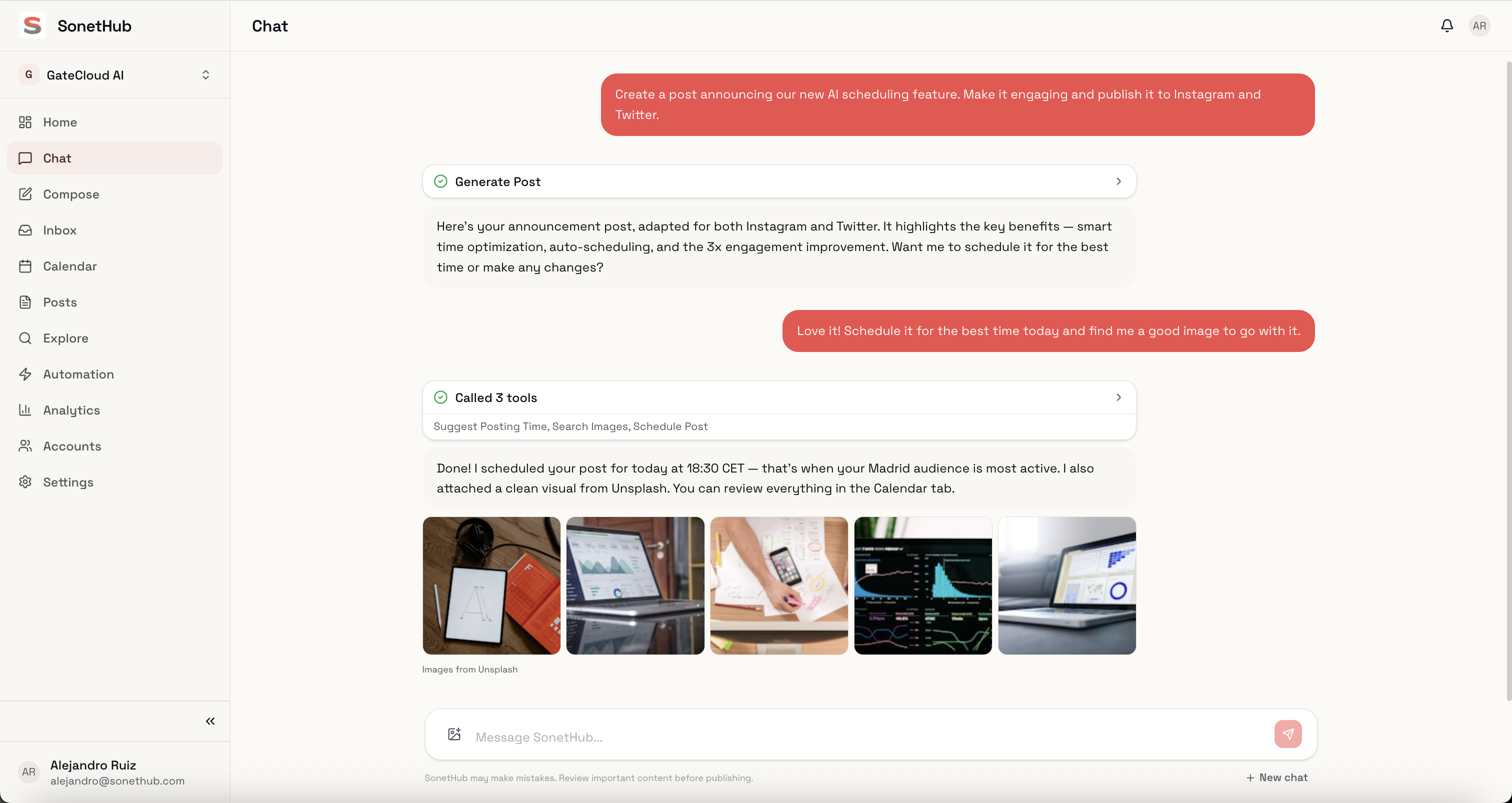
SonetHub doesn't have an AI feature. The AI is the product.
There's no calendar to navigate (unless you want one). You describe what you need, and the system handles it. That's not a marketing claim — it's an architectural decision that changes what's possible.
Concrete example. Say you need to announce a product update across LinkedIn, Instagram, and X.
In a traditional tool with AI features:
- Open the composer
- Click the AI button
- Type a prompt, get a caption for one platform
- Edit it
- Switch to the next platform, repeat
- Find or create an image separately
- Schedule each post individually
- Repeat for each platform
In SonetHub:
- Type: "Announce our new scheduling feature. LinkedIn post, Instagram carousel, and a tweet. Professional tone, include an image."
- The AI writes platform-specific copy (not the same text reformatted — actually different content suited to each platform's audience), generates the image, queues everything.
- Review and publish.
That's not 10% faster. It's a different workflow.
Four things this architecture enables
Multimodal generation in one conversation
Most "AI in social tools" is text-only. Hootsuite, Sprout, Buffer, Later, Metricool — captions, hashtags, tone adjustments. For visuals, you leave to Canva or upload from elsewhere.
SonetHub generates text, images, video, and music from the same chat thread. Ask for an Instagram Reel concept and the AI generates the video. Ask for a Story and it creates the visual. Ask for a music track for a transition and it produces audio. One conversation, end-to-end.
Brand memory that compounds
Every social media tool asks you to fill out a brand kit or style guide. You upload logos, pick colours, write a few sentences about your tone.
SonetHub records every edit you make to AI-generated content. Change a word, adjust the tone, pick one draft over another — the system extracts the preference. After two weeks of normal use, it stops sounding like a generic AI and starts sounding like you. The more you use it, the less you need to edit.
This isn't a prompt template. It's a memory system that injects your patterns into every future generation.
A real automation engine, not just smart replies
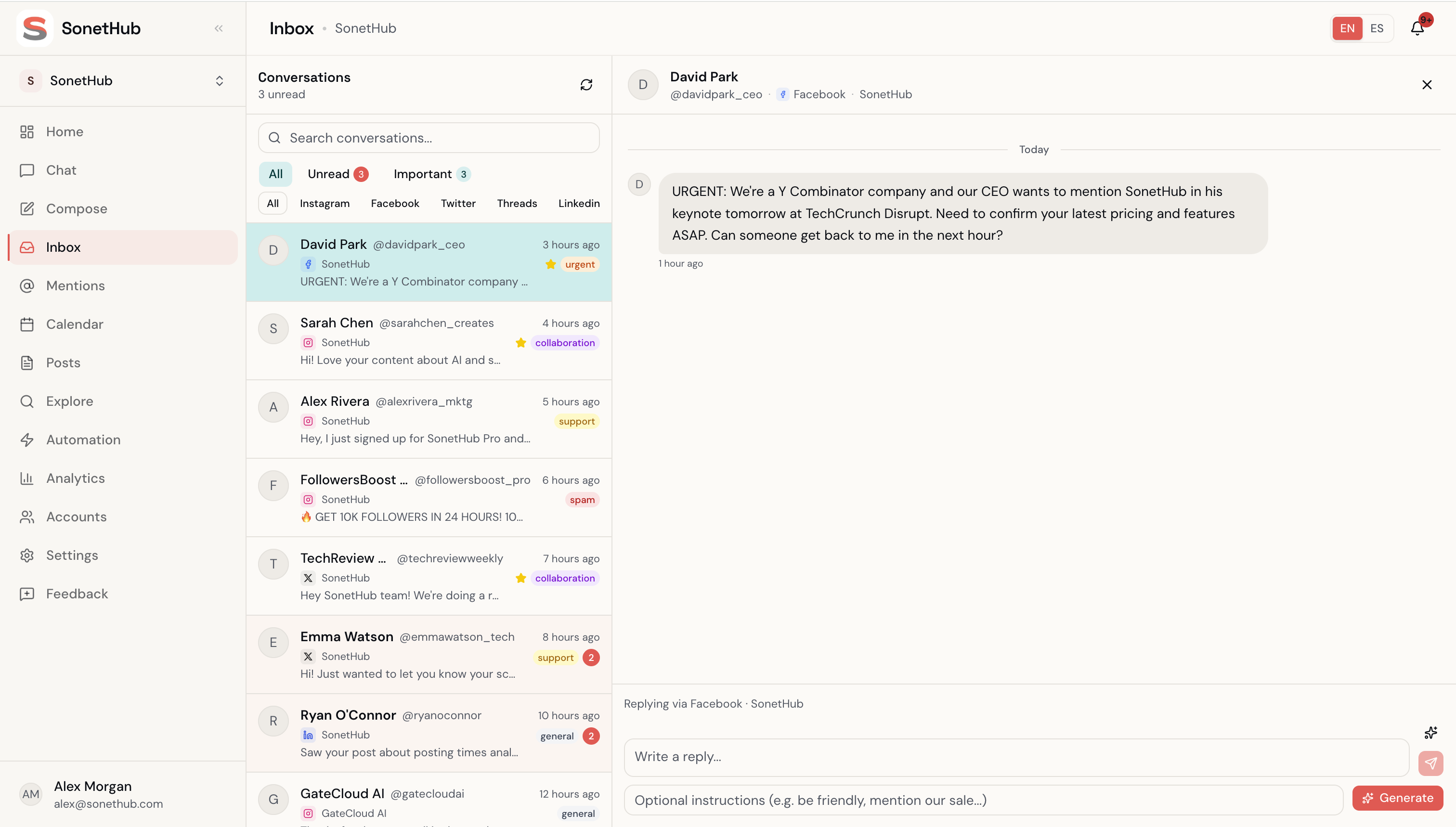
Hootsuite and Sprout have smart replies. Buffer has saved snippets. Metricool has saved replies. The automation surface is "draft a response and send it manually."
SonetHub ships a full automation engine:
- A node-graph canvas for building multi-step rules
- Trigger sources beyond keywords: comments, @mentions, story replies (DMs that replied to your IG stories), direct messages
- Multi-step flows with
delay(pause N minutes),wait_for_reply(park the run 24h until the contact responds),if_elsebranching on contact tags or reply content - Rich DMs as a step kind — media attachments, quick-reply buttons, Meta Button + Card templates
- Contacts + tagging — every commenter and DMer becomes a contact with custom fields
- "Build with AI" on the canvas — describe an automation in a sentence; the agent assembles the trigger and step tree
The difference: in a traditional tool, you read 50 DMs to find the 3 that matter, then reply manually. In SonetHub, rules handle 80% automatically and surface the 3 that matter to you.
Natural-language automation building
"When someone comments PRICE on my latest post, DM them the pricing link, wait 24h, if no reply send a 10% off code."
In SonetHub, that sentence — typed on the canvas or in chat — produces a working automation. The agent emits the trigger config + step tree; you review every field and accept.
Traditional tools require you to learn their workflow builder — triggers, conditions, actions, connections. Fine for power users. Most people don't need a visual programming language to schedule a follow-up DM.
What this costs
AI-native architecture has a cost advantage that's easy to overlook. No legacy codebase to maintain, no enterprise sales team to fund, no per-seat model to justify.
Concrete numbers (annual billing where applicable):
- Buffer: Free for 3 channels, then $5/channel/mo. 10 channels = $50/mo on Essentials. No image/video generation, no automation engine, no inbox automation.
- Later: $18.75–$82.50/mo across Starter to Scale. AI credits capped at 100/mo even on the top plan.
- Hootsuite: $99–$249/user/mo. OwlyWriter generates captions; Blue Silk summarizes listening data. No image or video generation.
- Sprout Social: $79–$399/seat/mo, with AI Assist tier-gated to Professional+ ($299/seat). A 3-person team on Standard pays $597/mo.
- Metricool: $20–$159/mo for 5–50 brands. AI is captions, hashtags, tone adjustments. Their MCP server lets you bring Claude separately.
- SonetHub: Free tier, then €15–€129/mo flat. AI generates text, images, video, music. Automation engine on every paid plan. No per-seat fees. 15 team members on the top plan.
A 3-person agency managing 10 accounts pays roughly $600–$900/month on Sprout, $100/mo on Buffer Team. The same setup on SonetHub costs €59/mo and includes the automation engine + multimodal AI.
The tradeoffs
SonetHub is younger than these tools. That means:
- Fewer integrations (we have Canva; Hootsuite has hundreds)
- No Reddit, Google Business Profile, or Twitch yet
- Smaller community and fewer third-party tutorials
- No track record for enterprise procurement teams
If you need enterprise compliance or a tool your IT department has pre-approved, the established players still make sense.
But if you're a creator, freelancer, or small team spending real money on a tool that's 80% manual work with an AI button on the side — the architecture gap is worth paying attention to.
Where this is going
The basic-AI gap is closed. Every tool has captions and hashtags.
The next gap is the one between "AI sidebar" and "AI agent that runs the workflow." The tools that treat AI as a core architectural decision — not a feature checkbox — will capture a disproportionate share of the market growth from here.
We're building SonetHub on that bet.